One clear photo and a few honest lines are enough for a birthday video starring the person you love. Here's how to pick the photo, write the brief and choose a style.
The short answer
You need one clear photo of the birthday person, about 50 words on who they are and what they love, and your birthday message. Choose a sharp, well-lit photo where their face is large and facing the camera, include one specific detail and one memory, then pick a voice and a visual style that suits them. A video template such as CosmosBites' Birthday Wish turns that into a video of about 30 seconds starring them. You can also make a simpler version yourself with a phone video editor in about 20 minutes.
Three ways to make a birthday video from one photo
There are three common routes. The right one depends on how much time you have and how you want the video to feel.
If you're doing it by hand, keep it simple: set the photo to about 30 seconds, add a gentle zoom toward the face, record your message in a quiet room with the phone close to your mouth, and keep the music low enough that every word is clear. Add their name as a title at the start, and you're done.
If you have many photos from different years, a one-photo video isn't the right format. A slideshow or a growing up video tells the years. A one-photo video celebrates who they are right now.
Step 1: Choose the one photo
Everything starts with the photo, because a video can only be as recognizable as the face it starts from. Spend five minutes here rather than grabbing the first picture in your camera roll.
Face clear and large. A head-and-shoulders shot beats a full-body shot from across the room.
Soft, even light. Daylight from a window is ideal. Avoid harsh midday shadows, strong backlight and colored party lights.
Sharp, not blurry. Zoom in on the eyes. If they're soft, pick another photo.
Eyes open, roughly facing the camera. A slight angle is fine; a full profile is harder to recognize.
Nothing covering the face: no sunglasses, hat-brim shadow, hand, mask or face paint.
Just them. If your favorite photo is a group shot, crop it so the birthday person fills the frame and no one else is in it.
The original file. A screenshot from a chat or a social post is usually smaller and more compressed than the photo itself, so ask for the original.
Recent, unless you have a reason. A current photo makes them instantly recognizable. A childhood photo can be a sweet twist for a milestone, as long as it is sharp.
Old prints work too if you photograph them well. Lay the print flat near a window, turn off the flash and shoot straight down. Our guide to finding and scanning old photos covers the details.
Step 2: Write a short brief about them
The brief is a few lines that tell the video who this person is. Aim for about 300 characters, roughly 50 words. That limit is a gift: it forces you to choose what matters.
Their name, and their age if you want it mentioned.
Two or three things they love that a camera could show. “Tomatoes and old radios” works; “being a great person” doesn't.
One memory, trait or inside joke that only people close to them would know.
Your message: what you want to thank them for, or wish them this year.
Here is the difference specifics make. A vague brief: “Happy birthday to my amazing grandpa, who is the best and loves his family.” A specific one: “Joe turns 75 and loves his vegetable garden, jazz records and Sunday crosswords. He taught every grandkid to whistle. Thank him for his patience and wish him a summer of big tomatoes.” The second gives a video something to show.
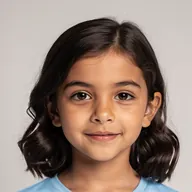
Nina's real brief follows the same pattern: “Nina turns 8 and loves drawing tide pools and seashells. She explores an imagined shoreline alone, following glowing shell clues to a birthday treasure of kind wishes. Celebrate her curiosity and imagination.” For more wording by relationship, see birthday wishes for everyone you love.
Step 3: Decide whether you appear in it
A video that comes from someone feels different from one that is only about someone. If the wish is yours, appearing in it makes that obvious. If it's from a group, like an office team, it usually works better to keep the birthday person alone on screen and name the group in the message.
In the Birthday Wish template, appearing is optional. Add a photo of yourself as the person saying happy birthday, with your relationship to the birthday star, and the greeting is written from your point of view. Use the same photo rules for your own picture.
Step 4: Pick a voice and a visual style
The voice and the style set the mood before a single word lands. For the voice, the simplest rule is to match the sender: a woman's voice for a message from mom, a man's voice for one from dad. For the style, think about the person's age and taste, not just the occasion.
When in doubt, pick the style of the things they already enjoy watching. A grandmother who reads picture books to the grandkids will probably love Illustration. A gamer in their twenties will probably prefer Anime.
Step 5: Know the length and the price
Birthday videos meant to be sent work best short. Thirty to sixty seconds feels like a gift and is short enough to watch twice in a group chat.
A Birthday Wish video runs about 30 seconds and costs 300 credits, and you see the price before you create. Every account can make one free Trial video with no credits needed, and credits never expire. See how credits and plans work.
Step 6: Share it at the right moment
Send it first thing in the morning, so it is one of the first messages they see.
For a party, play it on the TV right before the cake. Test the sound on that screen beforehand.
In a family group chat, send the video with one short line, not a long message that competes with it.
Ask before posting publicly, especially for children. A private send keeps the moment theirs.
Keep a copy. A birthday video is a keepsake you will want to find again next year.
CosmosBites videos can be downloaded and shared wherever you like, or published straight to YouTube and TikTok. Paid plans and unlocked videos export in HD with no watermark.
Real examples made from one photo
These were made with the Birthday Wish video template. Each started from one photo of the birthday star and a short brief.
Milo's Garden Machine Birthday
Nora celebrates Milo's seventh birthday with a garden invention, a pinwheel trail and a wish for new discoveries. 3D Animation, 29 seconds.
See how it was madeWhy it works: the whole video hangs on one detail that belongs to Milo, a garden invention, and ends on a wish that fits a curious seven-year-old.

Arthur's Garden of Stories
Arthur's 72nd birthday: tomatoes, old radios, family stories and thanks for his patience and wonder. Illustration, 28 seconds.
See how it was madeWhy it works: four concrete details and one sincere thank-you. The soft Illustration style suits a grandfather.
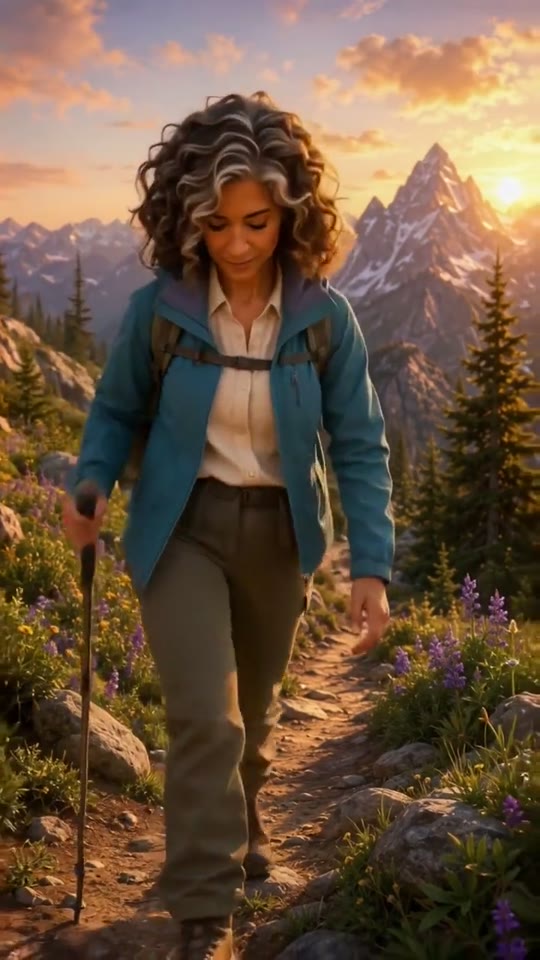
Elena's Trailblazer 60th
Sofia celebrates Elena's 60th with sunrise hikes, strong coffee and road trips. 3D Animation, 32 seconds.
See how it was madeWhy it works: a milestone birthday built around what Elena does, not the number. Sunrise hikes and road trips say “you're still on the trail” better than any age joke. Browse more in Community Examples.
Mistakes that make a birthday video feel generic
A blurry or tiny photo. Being recognized is the whole point.
A brief made of adjectives. “Kind, funny, amazing” describes half the planet; “sings to her tomato plants” describes one person.
Too many details. Three specifics beat ten, and a 300-character limit keeps you honest.
Jokes that need context. If the inside joke takes a paragraph to explain, save it for the card.
A message about you instead of them. Keep the spotlight on the birthday person, even when you appear in the video.
Questions and answers
Can you make a birthday video from just one photo?
Yes. One clear photo is enough for a short personalized video. You can pair it with your recorded voice in a video editor, or use a birthday video template that turns the photo and a few lines about the person into a short animated video starring them.
What kind of photo works best?
A sharp, well-lit photo where the face is large, the eyes are open and nothing covers the face. Crop group shots so only the birthday person is in the frame, and use the original file rather than a screenshot.
How long should a personalized birthday video be?
Thirty to sixty seconds is the sweet spot for a video you send. A Birthday Wish video from CosmosBites runs about 30 seconds.
Can I appear in the birthday video too?
In the Birthday Wish template, yes. Add a photo of yourself as the person saying happy birthday, with your relationship to the birthday star, and the greeting is written from your point of view.
How much does it cost, and can I try it for free?
A Birthday Wish video costs 300 credits, and you see the price before you create. Every CosmosBites account can make one free Trial video with no credits needed.
Can I make one for my child's birthday?
Yes. Milo's and Nina's videos were made for a seventh and an eighth birthday. Build the brief around what your child loves, and share it privately unless you're comfortable posting it publicly.
Make a Birthday Wish video
Wish them a happy birthday with a video starring them. Every account can create one free Trial video.
Create your Birthday Wish videoKeep reading